
Green Dot on Snapchat Meaning (2026): Activity Indicator Explained
Green Dot on Snapchat
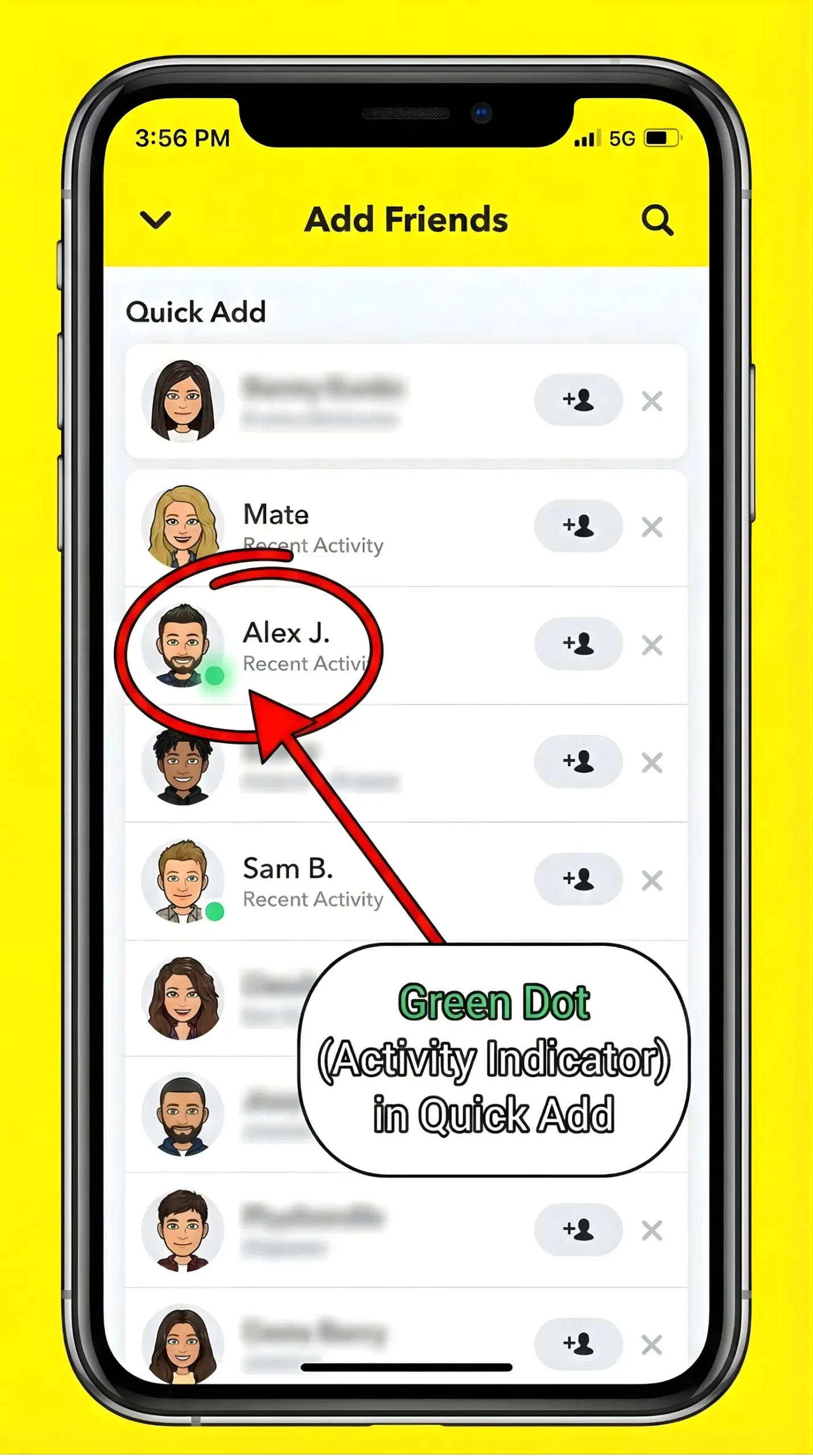
The Green Dot on Snapchat in 2026 is a simple activity indicator that shows when someone has been active recently, not whether they are online right now. It can stay visible for up to 24 hours and appears mainly in discovery areas like Quick Add, not in chats or stories.
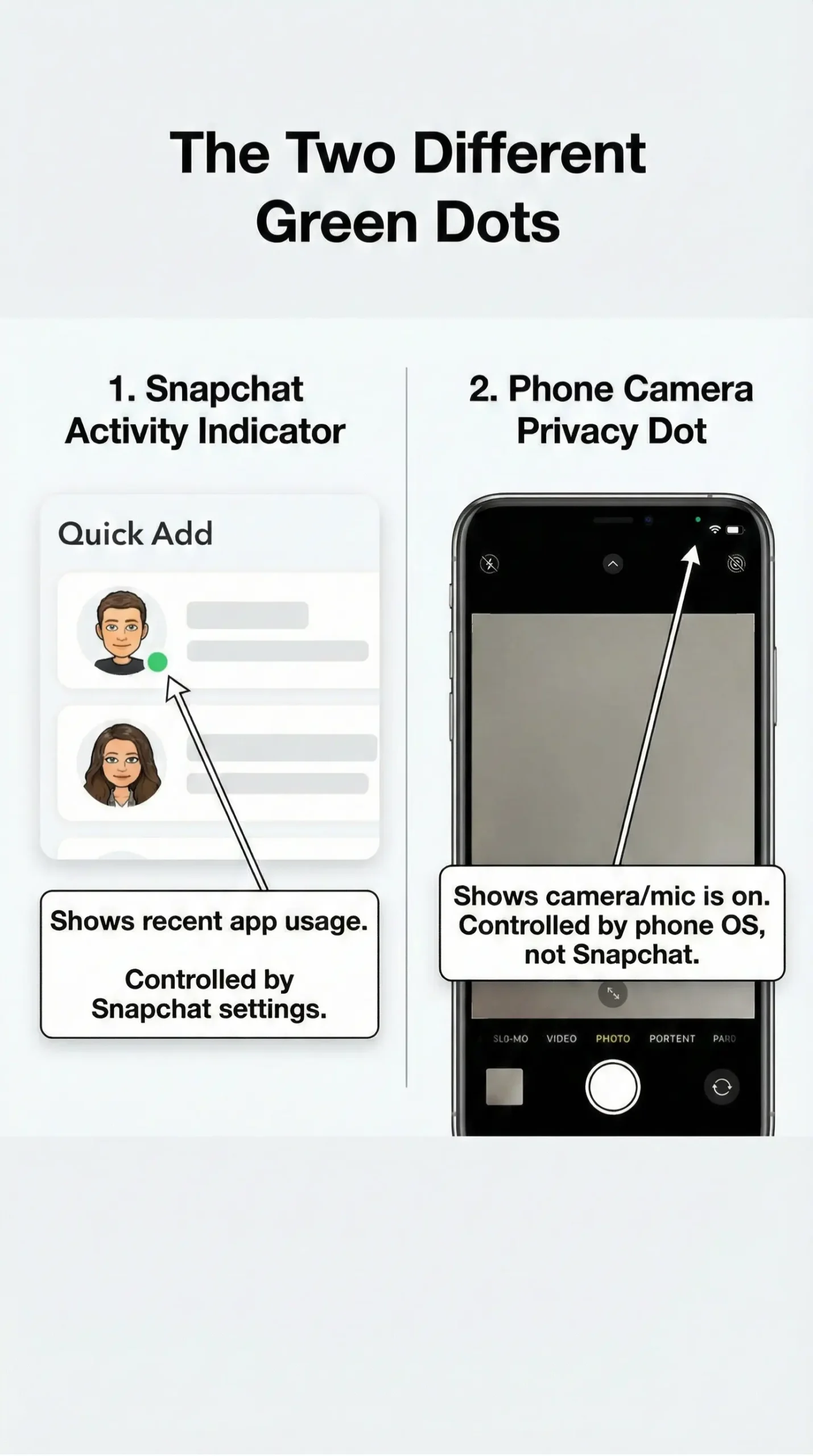
The green dot is different from the phone’s camera privacy dot, which appears when the camera is in use. Snapchat gives users full control to turn this feature off for privacy. This guide explains the meaning, duration, accuracy, and privacy options clearly, helping users understand the feature without confusion or assumptions.
What is the Green Dot on Snapchat?
The Green Dot on Snapchat is officially called the Activity Indicator. It shows that a user has been active on Snapchat recently, not necessarily that they are online at that exact moment.
Snapchat introduced this feature to make it easier for users to spot active profiles, especially when sending friend requests or checking suggested users.
Important Thing To Remember:
- Green dot ≠ live online status
- Green dot = recent activity (up to 24 hours)
This is Snapchat’s way of staying social without showing exact timestamps.
Why Snapchat Uses an Activity Indicator
Snapchat is designed around quick interactions. The green dot helps:
- Identify active users
- Increase chances of faster replies
- Encourage real conversations, not ghost profiles
At the same time, Snapchat avoids showing “online now” labels like WhatsApp or Messenger. That’s a deliberate privacy move.
Where You Will See the Green Dot
Places Where the Green Dot Appears
You will mostly notice the Green Dot on Snapchat in:
- Quick Add section
- Add Friends screen
- Some profile previews
This is intentional. Snapchat wants to help you discover active people, not monitor friends.
Places Where It Does NOT Appear
You will not see the green dot in:
- Chat conversations
- Stories view
- Friend list main screen
This design reduces pressure and avoids awkward “why aren’t they replying?” moments.
How Long Does the Green Dot Stay Visible?
This is where most confusion comes in.
General Time Window:
- Can stay visible up to 24 hours
- It may disappear a few minutes after someone closes the app
- Can reappear if the app runs briefly in the background
So if you see a green dot, do not assume someone is ignoring you. They might have opened Snapchat hours ago and left.
Two Different Green Dots People Confuse
Profile Activity Green Dot
This One:
- Appears near Bitmojis
- Shows recent Snapchat usage
- Can be turned off in privacy settings
Camera Privacy Green Dot
This dot appears at the top-right of your phone screen and is NOT controlled by Snapchat.
On:
- iPhones (iOS 14+): shows camera usage
- Android (12+): shows camera or mic usage
Since Snapchat opens directly to the camera, this dot appears instantly. It’s a phone security feature, not a Snapchat feature.
Is the Green Dot on Snapchat 100% Accurate?
No, Green Dot on Snapchat is not accurate.
Here Is Why:
- App opened for 5 seconds → green dot appears
- App running in background → dot may stay
- Slow internet → delayed updates
Snapchat designed it as a soft signal, not a tracker. It shows usage patterns, not behavior.
Can You Turn Off the Green Dot on Snapchat?
Yes, and many privacy-conscious users in the US already do. You can disable the Activity Indicator from Snapchat’s privacy settings.
Once Turned Off:
- Others won’t see your green dot
- You can still use all Snapchat features
- You may still see dots for users who keep it on
This setting gives you control without breaking the app experience.
Use Ghost Mode on Snapchat
If you care about privacy, pair this with Ghost Mode on Snap Map. It hides your real-time location and works well with turning off the green dot.
This Combo Is Popular Among:
- Teen users
- Professionals
- Parents managing family accounts
Green Dot on Snapchat vs Other Social Apps
Compared to platforms like Instagram or Messenger:
| Feature | Snapchat | Messenger | |
|---|---|---|---|
| Shows Online Status | ❌ No | ✅ Yes | ✅ Yes |
| Last Seen Information | ❌ Not Available | ✅ Available | ✅ Available |
| Chat Timestamps | ❌ No | ⚠️ Limited | ✅ Yes |
| Where Activity Is Shown | Discovery Only | Chat Inbox | Chats Everywhere |
| Privacy Level | ✅ High | ⚠️ Medium | ❌ Low |
| Reply Pressure | ✅ Low | ⚠️ Medium | ❌ High |
Snapchat keeps activity signals minimal, which makes it feel less invasive, more private, and stress-free compared to Instagram and Messenger.
FAQs About Green Dot on Snapchat
Final Summary
The Green Dot on Snapchat is a simple activity signal, not a spying tool. It helps users spot recently active profiles while still protecting privacy. It does not mean someone is chatting, ignoring you, or even holding their phone.
If you value privacy, turn it off. If you like knowing who is active, leave it on. Snapchat gives you the choice, and that is the real win. Understanding this small dot saves you from big misunderstandings.